How SceneSend Works
Three simple steps: upload, receive a code, and download. No subscription. No sign-up required for receivers.
Fast • Secure • Effortless
1. Upload
Select and upload your file
2. Get Code
Receive a unique 5-digit PIN
3. Download
Recipient enters code, gets file
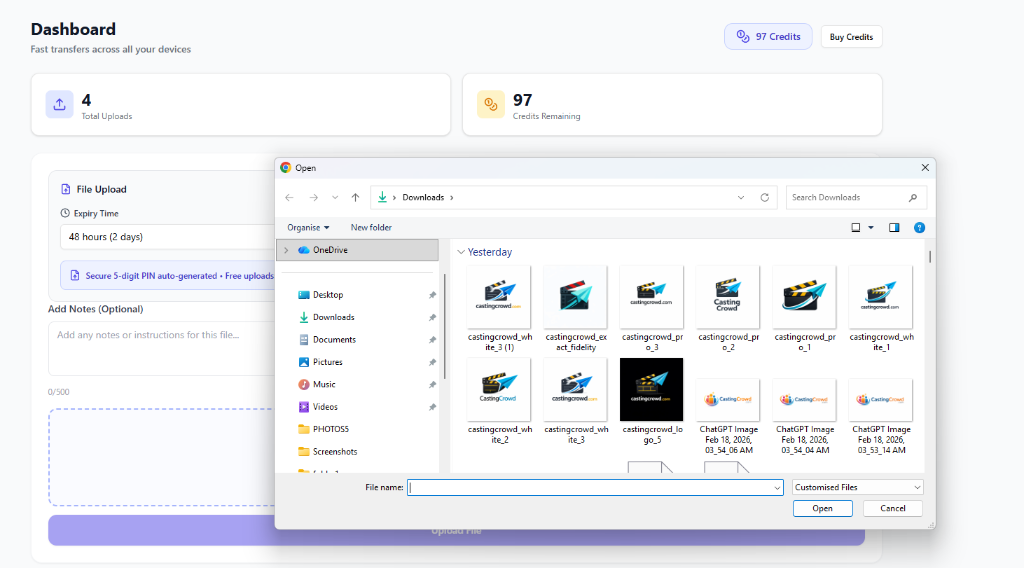
Upload Your File
Click "Upload a File" on your dashboard, select the file you want to transfer, and choose how long you'd like it to exist (1, 24, or 48 hours).
Your file is encrypted and stored securely. You remain in complete control — decide the expiry time and delete it anytime.
- Supports all file types (documents, images, video, audio)
- Upload in under 3 seconds
- Max file size: 50MB
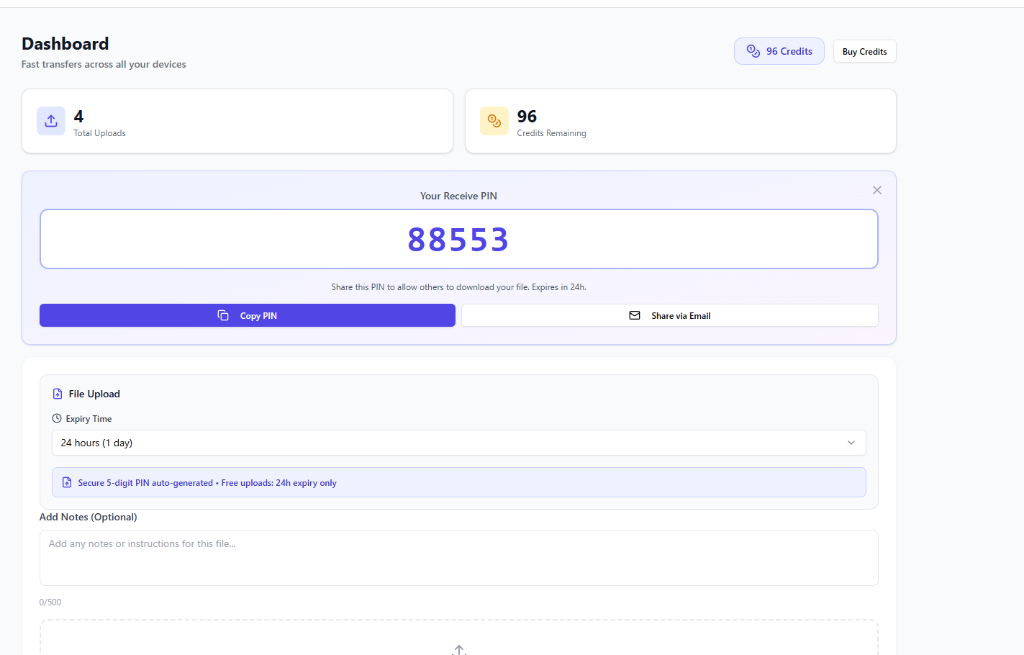
Get a Unique Code
After uploading, SceneSend automatically generates a unique 5-digit PIN. This code is your access key.
Share the PIN with your recipient via email, messaging, chat, or any communication method. No login or account required on their end.
- Unique 5-digit PIN (easy to share verbally)
- One-click copy or share
- Code expires when file expires
Recipient Downloads File
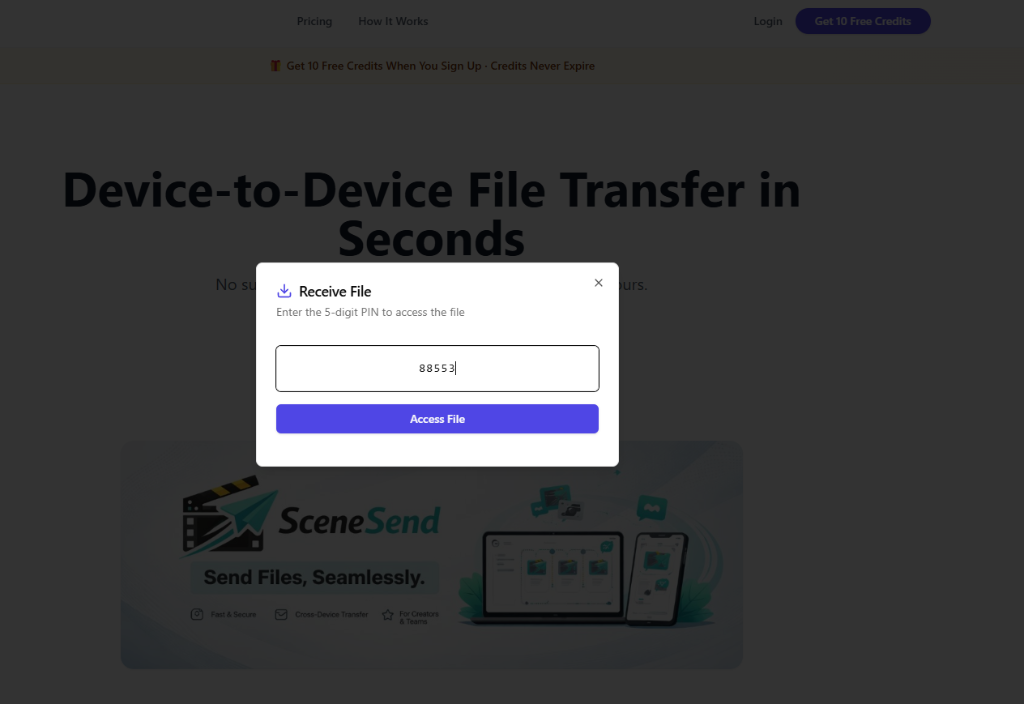
Your recipient visits SceneSend, enters the 5-digit PIN, and instantly accesses the file. No sign-up. No login. No friction.
They see the file name, size, and expiry time before downloading. Once downloaded, they can use it immediately. The file auto-deletes after your chosen time window.
- Instant access — no email verification required
- One-time access link — secure and traceable
- Works on any device, browser, or platform
Why SceneSend Works Better
No Login Required
Recipients don't need an account. Just enter the code and download. Zero friction.
Auto-Delete Files
Choose 1, 24, or 48-hour expiry. Files automatically delete after the window closes.
Any File Type
Documents, images, videos, audio, code — transfer anything up to 50MB instantly.
Lightning Fast
Upload and download in under 3 seconds. No waiting, no delays.
Pay-Per-Upload
No subscription. No monthly fees. Only pay for what you use.
Enterprise Security
2FA protection, row-level security, and encrypted transfers.
Frequently Asked Questions
Is SceneSend secure?
Yes. All files are encrypted in transit and at rest. Uploads are protected by account-level 2FA and row-level security policies. Only the person with the PIN can access the file. We don't store files longer than you choose — they auto-delete.
Do recipients need a SceneSend account?
No. Recipients only need the 5-digit PIN. They don't need to sign up, login, or create an account. They visit SceneSend, enter the code, and download instantly.
How much does it cost?
You get 10 free credits when you sign up (credits never expire). Each upload costs 1 credit. Buy bundles at your own pace: 5 uploads for £0.95, 10 for £1.50, 50 for £6.00, or 200 for £20.00. No monthly subscription required.
What's the maximum file size?
You can upload files up to 50MB. For larger files, consider splitting them or contacting our support team for enterprise options.
How long do files stay accessible?
You control this. Choose 1 hour, 24 hours, or 48 hours when uploading. After that, the file and its code expire automatically. You can also manually delete files anytime.
Can I see who downloaded my file?
Yes. Your dashboard tracks all uploads and downloads. You'll see when the file was accessed and from which device, so you know your transfer was successful.
The Simplest Way to Transfer Files Between Devices
SceneSend is a modern file transfer solution designed for anyone who needs to send files quickly without the hassle of email attachments, cloud storage signups, or complicated sharing links.
Unlike traditional file sharing platforms that require both parties to create accounts, SceneSend eliminates friction. Senders upload a file and get a unique PIN. Recipients simply enter the code—no signup, no login, no email verification.
Perfect for device-to-device file transfer, temporary file sharing, and secure cross-device collaboration, SceneSend works across all platforms: desktop, tablet, and mobile.
Use Cases for SceneSend
- Film crews sharing footage between cameras and editing bays
- Designers sending hi-res files to clients or collaborators
- Sales teams sharing presentations without email limits
- Support teams quickly delivering software or documentation
- Students and educators exchanging assignments and materials
- Anyone needing a temporary file link that auto-deletes
Why Choose SceneSend?
- No subscription: Pay only for uploads. Get 10 free credits at signup.
- No accounts required for recipients: Share a 5-digit code, not a complex link.
- Auto-delete feature: Files expire after 1–48 hours you choose.
- Enterprise security: Encryption, 2FA, and row-level access control.
- Lightning fast: Upload and download in under 3 seconds.
- Works everywhere: Desktop, mobile, tablet — any browser, any OS.
Fast. Secure. Simple.
© 2026 SceneSend. All rights reserved.